Ad · Our pick · best all-rounder

The best all-rounder.

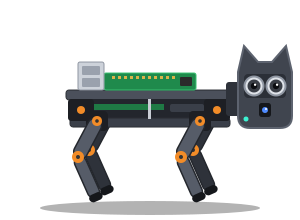
SunFounder PiDog. Most people. It's the sweet spot: proper dog-like personality, built-in voice, and plenty of examples to get your AI talking through it.

Ad · affiliate links: "View on Amazon" buttons are affiliate links. As an Amazon Associate we earn from qualifying purchases, at no extra cost to you. How this works.

What it can do

  • Walk, sit, lie down and wag its tail
  • Look around with the camera in its nose
  • Hear you through its mic and answer through its speaker
  • React when you pat the touch sensor on its head

What else you'll need

  • A Raspberry Pi (check the maker's listing for supported models)
  • A microSD card (16 GB or more)
  • A USB-C charger, if one isn't in the box

Honest limits

  • A few hours to build and calibrate
  • Battery life is measured in hours, not days
  • Can't do stairs or pick things up

Build time

An afternoon. Clear instructions; no soldering.

Price band 2 of 3: mid-range kit

View the SunFounder PiDog on Amazon (affiliate link, opens in a new tab)Ad · affiliate link · check today's price on Amazon

Specs are summarised from the maker's listing; check the Amazon page for the full, current details and price. Illustration is our own drawing, not a product photo.

🤔 Is it right for you?

Is the SunFounder PiDog right for you?

This is our best all-rounder. It walks, sits and wags its tail, has a camera in its nose and a mic and speaker built in, so it feels like a proper little housemate once your AI is talking through it.

Great if you…

  • want the most personality for your money
  • want a mic and speaker built in, so you can just talk to it
  • like a bit of building but don't want to solder
  • want plenty of examples to get your AI talking through it

Maybe not if you…

  • want zero building (look at the Rider-Pi)
  • are on the tightest budget (look at the Freenove)
  • need something that can manage stairs (none of these can)

Tips for getting the best from it

  • Build and calibrate it on a flat table, then let it live on the floor, never on a table edge.
  • Pat the touch sensor on its head as a friendly way to start a chat with your AI.
  • Talk to it in a fairly quiet room and from a few metres away for the best results.
  • Pop it on charge when you're done playing, so it's ready when you're out and want to check in.
  • Introduce it to pets slowly, and don't leave them alone together.
✨ Setting it up

One prompt, then your AI does the hand-holding.

Copy our setup prompt, put SunFounder PiDog as your robot model, and your assistant will guide you through it one step at a time.

❓ Quick questions

SunFounder PiDog: quick questions

Does it come with a Raspberry Pi?

No, you'll need to buy one separately. Check the current listing for the supported models.

Can it hear me across the room?

It has a built-in microphone, so yes, within reason. It works best in a fairly quiet room and within a few metres.

Is it OK around pets and children?

Many pets are curious or a bit wary at first, so introduce it slowly and supervise. It has small parts and moving legs, so it's not a toy for little ones; follow the maker's age guidance.

How long does the battery last?

Hours, not days. Charge it after a play session so it's ready for when you're out.

More answers on our FAQ page, or compare all four bots.

👀 Also consider

The other three bots.