Ad · Starter · budget DIY

The budget build.

Freenove Robot Dog Kit (FNK0050). Tinkerers on a budget who fancy an afternoon (or two) of building, and don't mind adding a mic and speaker themselves.

Ad · affiliate links: "View on Amazon" buttons are affiliate links. As an Amazon Associate we earn from qualifying purchases, at no extra cost to you. How this works.

What it can do

  • Walk, turn and look around on its four legs
  • See with its camera, and judge distance with its ultrasonic sensor
  • Be driven from a phone, tablet or computer over Wi-Fi
  • Talk and listen once you add a small USB mic and speaker

What else you'll need

  • A Raspberry Pi (check the maker's listing for which models it supports)
  • A microSD card (16 GB or more)
  • Rechargeable batteries of the type the kit specifies, plus a charger
  • A small USB mic and speaker, for chatting to your AI

Honest limits

  • It's a kit: expect a few hours of building and calibrating
  • No mic or speaker in the box, so voice needs add-ons
  • Prefers hard floors; deep carpet slows it down

Build time

A long afternoon. Screwdriver skills more than coding skills.

Price band 1 of 3: budget kit

View the Freenove Robot Dog on Amazon (affiliate link, opens in a new tab)Ad · affiliate link · check today's price on Amazon

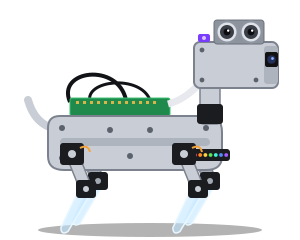
Specs are summarised from the maker's listing; check the Amazon page for the full, current details and price. Illustration is our own drawing, not a product photo.

🤔 Is it right for you?

Is the Freenove Robot Dog right for you?

It's the budget way to give your AI a body: a four-legged walking kit with a camera that you build yourself. That's half the fun if you like making things, and a bit of a slog if you don't.

Great if you…

  • enjoy building things and want to know every screw
  • want the cheapest way into a walking robot with a camera
  • are happy to add a small USB mic and speaker for voice
  • fancy learning how robots actually work

Maybe not if you…

  • want it working tonight, straight out of the box
  • want voice built in with no add-ons
  • mostly have deep carpet at home

Tips for a smooth build

  • Charge the batteries before you start, so you can test as you go.
  • Follow the maker's calibration steps carefully. Well-calibrated legs walk much better.
  • Keep the tiny screws in a mug or a magnetic tray. You will drop one.
  • Check the camera works in the maker's own app before you connect your AI.
  • Give it a clear patch of hard floor for its first walk.
✨ Setting it up

One prompt, then your AI does the hand-holding.

Copy our setup prompt, put Freenove Robot Dog Kit (FNK0050) as your robot model, and your assistant will guide you through it one step at a time.

❓ Quick questions

Freenove Robot Dog: quick questions

Do I need to know how to code?

Not really. The maker supplies the code and guides, and our setup prompt gets your AI assistant to walk you through the bridge one step at a time. Being comfortable copying commands into a terminal helps.

Which Raspberry Pi do I need?

Check the current Amazon listing and the maker's documentation for supported models, because it changes as new boards come out. Buy the Pi from a reputable seller.

Can it talk to me?

Not out of the box. Add a small USB microphone and speaker and your AI assistant can listen and reply through the robot.

Will it cope with my floors?

It's happiest on hard floors and low-pile rugs. Deep carpet and door thresholds slow it down or stop it.

More answers on our FAQ page, or compare all four bots.

👀 Also consider

The other three bots.